Introduction
In the past, Enterprise Resource Planning (ERP) software was seen as a luxury only large corporations could afford. But in 2025, that has completely changed. Thanks to advances in cloud computing, artificial intelligence (AI), and modular design, ERP systems have become more affordable, scalable, and user-friendly — perfectly suited for small and medium-sized businesses (SMBs).
Today’s small businesses no longer need to juggle multiple disconnected tools for accounting, inventory, HR, and sales. With modern ERP solutions, they can manage everything from one unified platform, gaining real-time visibility, efficiency, and control.
This article explores how ERP software is transforming small businesses in 2025 and how you can choose the right system for your growing company.
1. Why Small Businesses Need ERP in 2025
Small businesses face many challenges — limited resources, increasing competition, and a constant need for efficiency. ERP systems help address these by:
Centralizing data across all departments for better collaboration.
Automating repetitive tasks, such as invoicing, inventory tracking, and reporting.
Reducing human error and improving decision-making with real-time insights.
Supporting growth by scaling operations without adding complexity.
In 2025, the ERP market has evolved to serve small enterprises with lightweight, cloud-based, and AI-powered solutions that deliver big-business capabilities without the big-business price tag.
2. Key Trends Driving ERP Adoption Among Small Businesses
a) Cloud-Based Solutions
Cloud ERP is now the default for small businesses. It eliminates the need for expensive servers and IT staff while providing:
Lower upfront costs (subscription-based pricing).
Automatic updates and maintenance.
Easy remote access for hybrid work environments.
b) Artificial Intelligence and Automation
AI-driven ERP tools help small businesses predict demand, automate payroll, and identify trends — saving time and boosting efficiency. For example, predictive analytics can alert owners to potential stock shortages before they occur.
c) Modular and Scalable Systems
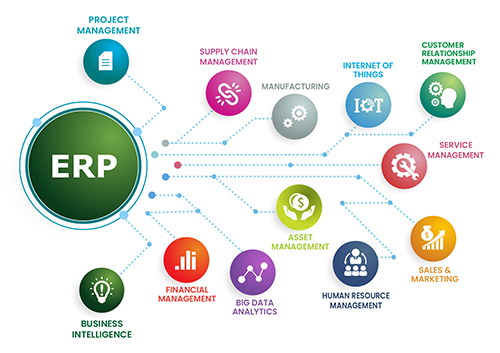
Small businesses can start with only the modules they need (like accounting or inventory) and add more features later as they grow — keeping costs manageable.
d) Mobile Accessibility
ERP platforms in 2025 are fully mobile-compatible, allowing business owners to monitor operations, approve transactions, and access reports on the go.
e) Enhanced Data Security
With rising cyber threats, modern ERPs now include advanced encryption, authentication, and compliance tools, ensuring small businesses can protect sensitive data without complex infrastructure.
3. Benefits of ERP for Small Businesses
1. Improved Efficiency and Productivity
By automating key processes — from order management to billing — ERP helps teams work faster and reduce manual errors.
2. Better Decision-Making
With real-time data dashboards, business owners can monitor performance, track expenses, and forecast revenue more accurately.
3. Enhanced Customer Experience
Integrated CRM features allow companies to manage leads, personalize services, and respond faster to customer inquiries.
4. Cost Savings
Modern ERP reduces duplication of work and minimizes the need for multiple software subscriptions, leading to significant long-term savings.
5. Scalability
Whether you’re managing 10 employees or 200, cloud-based ERP platforms can easily grow with your business.
4. How to Choose the Right ERP System for Your Small Business
Step 1: Identify Your Needs
Define the main challenges you want to solve — whether it’s managing inventory, automating payroll, or improving financial reporting.
Step 2: Set a Realistic Budget
Choose a pricing model that fits your financial capacity. Subscription-based or pay-as-you-go options are ideal for small businesses.
Step 3: Prioritize Ease of Use
Look for ERP systems with intuitive interfaces, minimal training requirements, and strong customer support.
Step 4: Ensure Integration Capabilities
Make sure your ERP can integrate with existing tools like accounting software, e-commerce platforms, or CRMs.
Step 5: Verify Vendor Reliability
Select a vendor that offers:
Strong customer support and onboarding assistance.
Regular updates and innovation.
Positive reviews from other small business users.
5. Top ERP Features Small Businesses Should Look For
Accounting and Finance Management
Inventory and Supply Chain Tracking
Customer Relationship Management (CRM)
Human Resources and Payroll Automation
Reporting and Analytics
Mobile and Cloud Access
Scalable Modules for Growth
6. Common Mistakes to Avoid
Choosing an ERP that’s too complex or enterprise-oriented.
Ignoring employee training and change management.
Underestimating integration needs.
Selecting a system based solely on price, not long-term value.
7. The Future of Small Business ERP
In 2025 and beyond, ERP systems will continue to evolve with AI-driven insights, voice-enabled dashboards, and predictive automation. These advancements will make it even easier for small businesses to compete with larger enterprises.
Affordable pricing, flexible deployment, and smart features are transforming ERP from a luxury into a strategic necessity for every growing business.
Conclusion
ERP software in 2025 is no longer out of reach for small businesses. With affordable cloud-based pricing, scalable modules, and smart automation, today’s ERP solutions empower small companies to run more efficiently, make smarter decisions, and grow confidently in a competitive marketplace.
Choosing the right ERP means choosing a partner for your long-term success — one that evolves with your business, supports innovation, and helps you stay ahead in a fast-changing digital world.